Paged Docs / Embedding the editor
Profiles and presets
An editor profile is data — the bundles, modes and chrome regions an editor has and what each region holds. Presets are named profiles; ?profile= picks one.
Reviewed against engine v0.74.2
A profile describes an editor without code.
In short An EditorProfile names a preset it extends and may set the
title, the plugin bundles to activate, the host panels, the workflow modes, the
chrome regions and their ordered contents, the canvas furniture, the size of a
new document, the storage scope, feature switches and the session role.
resolveProfile expands the extends chain; nothing in it throws — an unknown
preset, a cycle or a malformed field becomes a problem in the result, and the
editor still starts.
Presets
| Preset | Role | What it is |
|---|---|---|
full | editor | The whole editor: every bundle, panel, tool, menu and mode. The base every chain starts from. |
solo:<name> | editor | One module's application: solo:draw, solo:image, solo:sheet, solo:doc, solo:web, solo:data. One bundle, its own tools and menus, one mode, no mode bar. |
template-fill | filler | Fill in a template: Undo, Redo and Save in the header; select, type, hand and zoom on the tool rail; the canvas without rulers or title bar; the template form as the inspector. No menu bar, context toolbar, panel rail, mode bar, command palette or canvas context menu. |
viewer | viewer | The canvas and its page thumbnails, a hand and zoom rail, nothing else. |
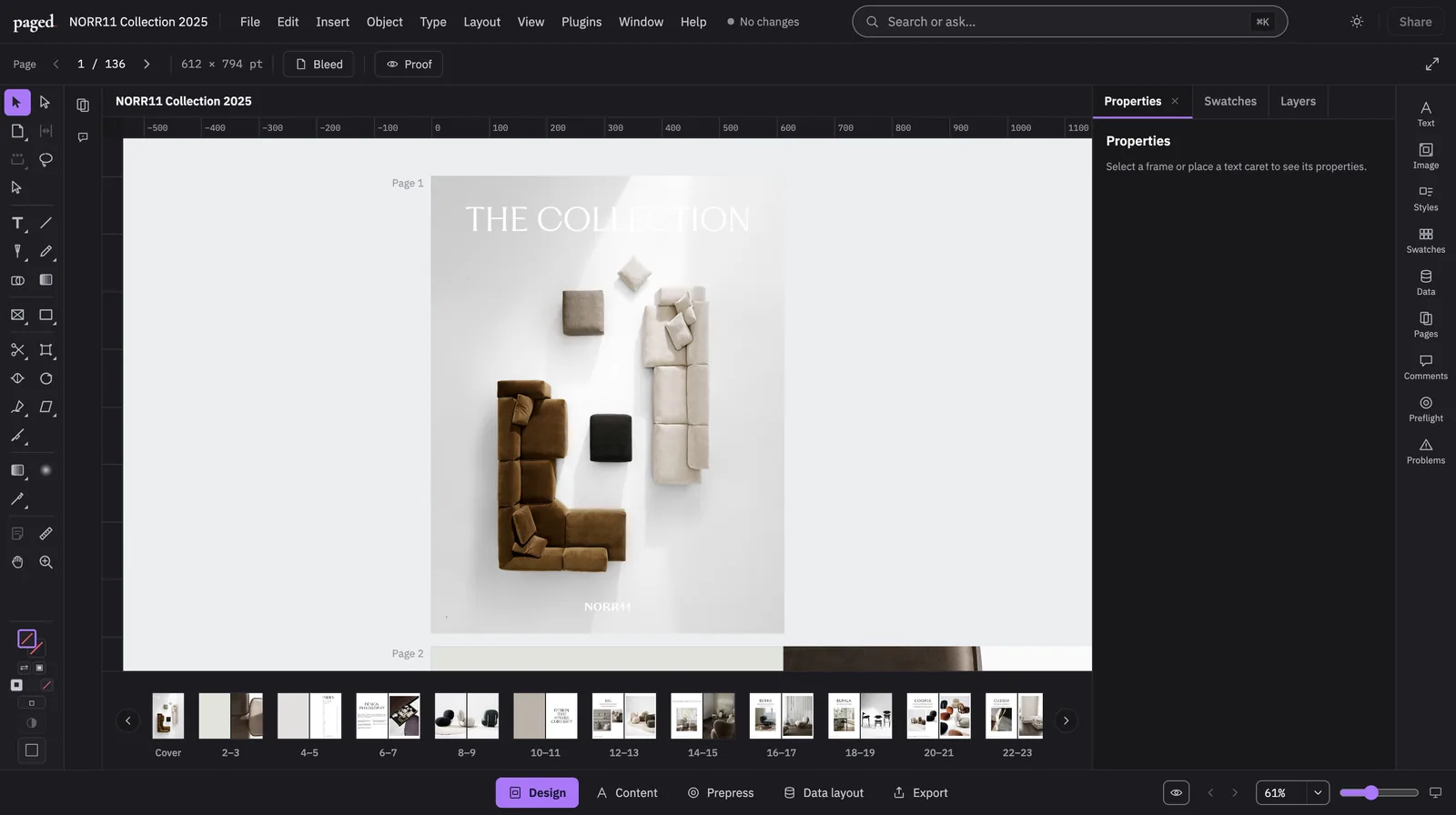
full: the whole editor, with every bundle, panel, tool, menu and mode, opened on a sample catalogue with the sample option. The catalogue was rebuilt in Paged from its publisher’s PDF (archive.org), shown for illustration only.Recorded in the Paged editor at 2c960ecbe, .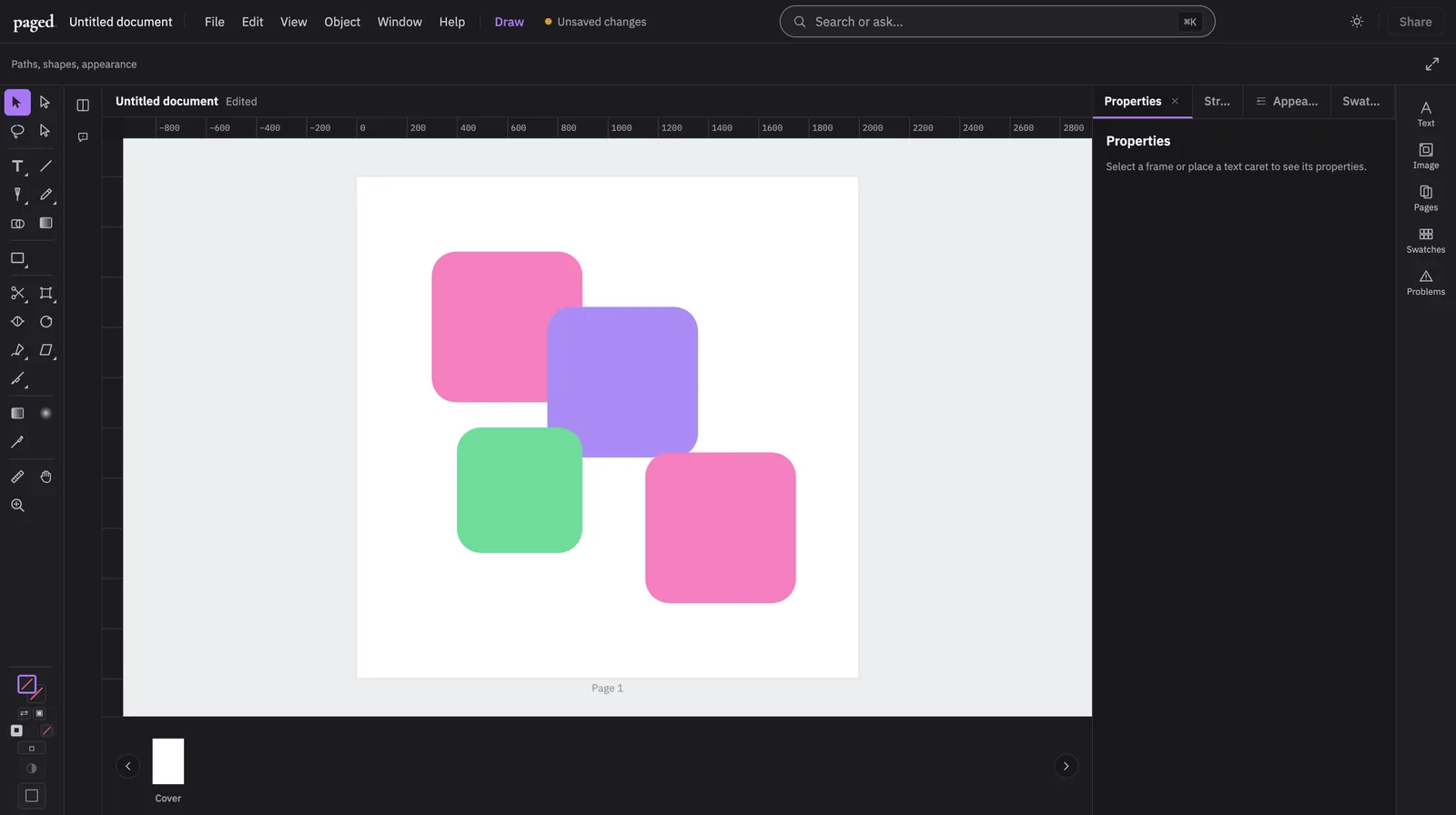
solo:draw: the draw module’s application, with its own tools and menus and no mode bar.Recorded in the Paged editor at 2c960ecbe, .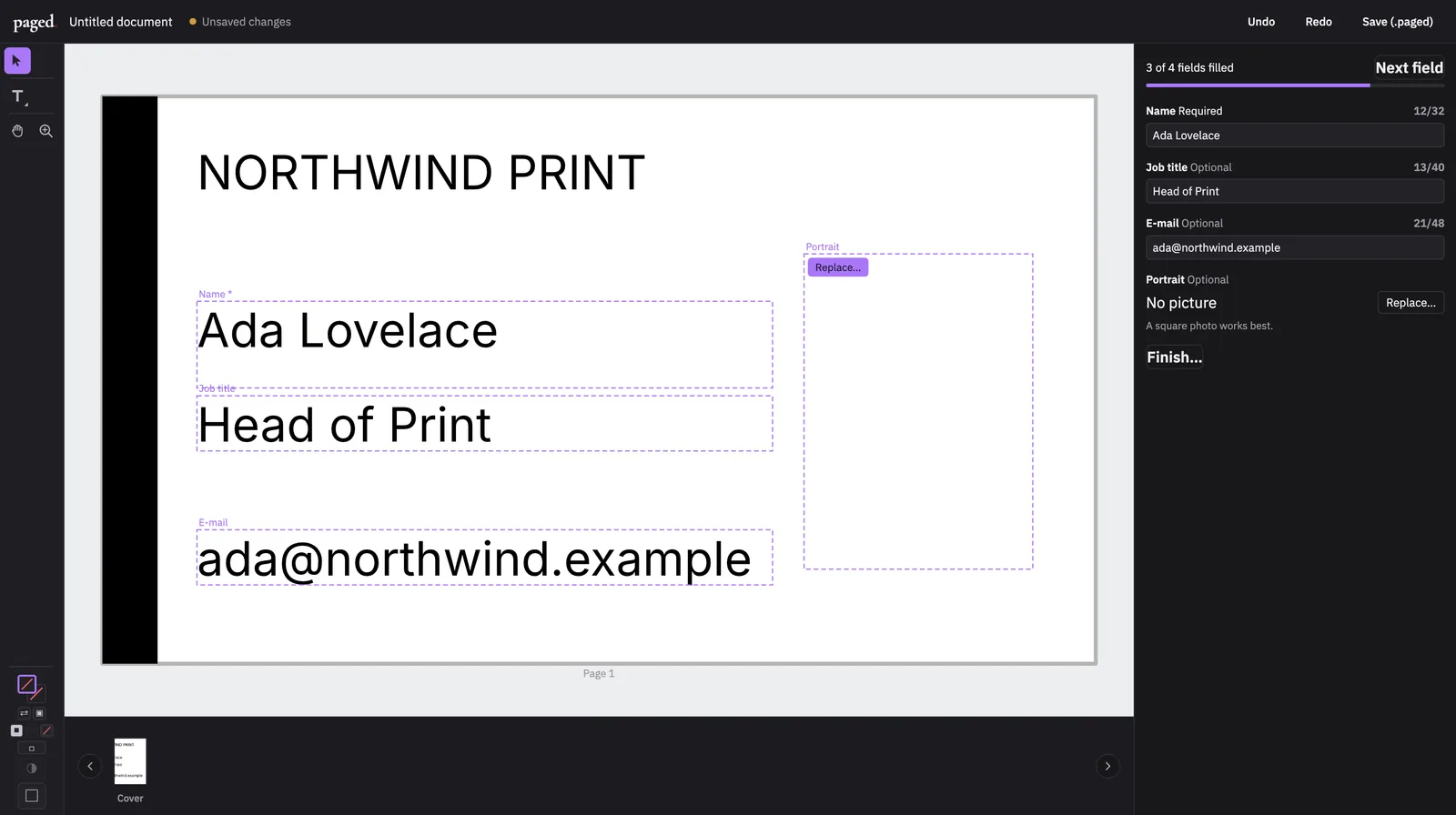
template-fill: Undo, Redo and Save, a short tool rail, and the template form as the inspector.Recorded in the Paged editor at 2c960ecbe, .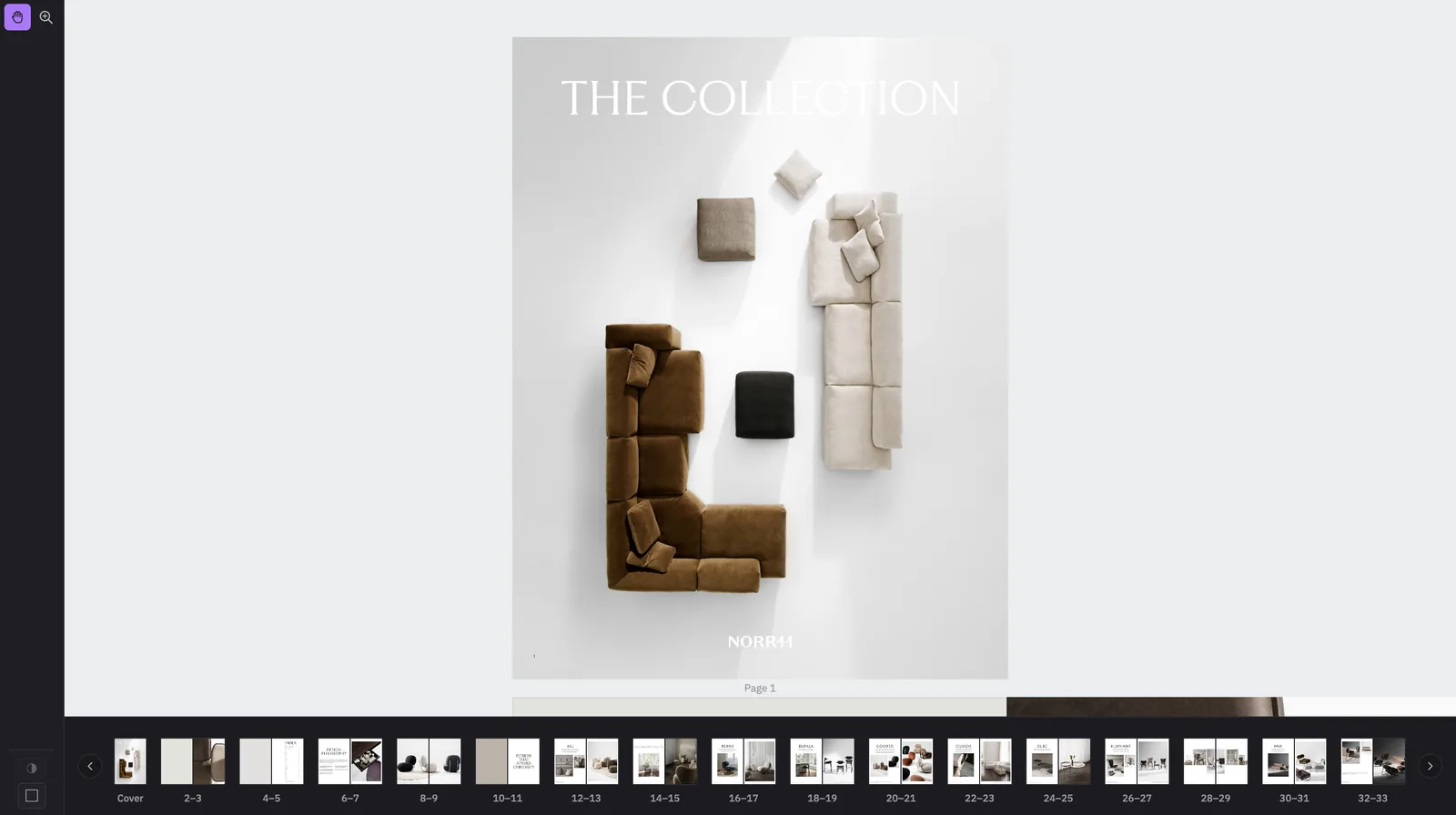
viewer, with the viewer role: the canvas and its page thumbnails, and a rail of Hand and Zoom. The sample catalogue was rebuilt in Paged from its publisher’s PDF (archive.org), shown for illustration only.Recorded in the Paged editor at 2c960ecbe, .Choosing one from the URL
The editor reads its profile from the query string:
?profile=<preset>— for example?profile=template-fillor?profile=solo:draw;?solo=<name>— the older spelling, kept as an alias:?solo=paged.drawmeanssolo:draw.
No parameter means full. An unknown name also means full, with a problem
logged to the console.
The profile
interface EditorProfile {
  extends?: string;                       // a preset id
  title?: string;                         // mode title and title-bar badge
  bundles?: 'all' | string[];             // plugin bundles, by manifest id
  panels?: 'all' | string[];              // host panels (plugin panels come with their bundle)
  modes?: 'all' | ProfileMode[];          // workflow modes; ids are open strings
  regions?: Partial<Record<RegionId, { items: 'all' | RegionItem[] } | null>>;
  adjust?: RegionEdit[];                  // edits applied after the chain is merged
  canvas?: { titleBar?: boolean; rulers?: boolean; thumbnails?: boolean };
  documentSizePt?: [number, number];      // the document created at start when none is open
  storageScope?: string;                  // separates this profile's stored layout and mode
  features?: Record<string, boolean>;     // feature switches, by id or glob
  role?: 'author' | 'editor' | 'filler' | 'viewer';
}
Resolution. Each layer of the chain is applied over its parent: a field
replaces the parent's, a region absent in a layer inherits, and a region set to
null is removed. The layer's adjust edits run after its regions. Feature
switches merge, a later key overriding an earlier one.
Mode ids are open. A preset declares its own mode (fill, view) instead
of borrowing one of the editor's six. An editor with one mode shows no mode
badge, and a stored mode id this editor does not have falls back to its first
mode.
Regions
| Region | What it is |
|---|---|
header | The top row. A list here replaces its right-hand cluster with command buttons. |
menubar | The menu bar inside the header (removing it keeps the header). |
context-toolbar | The toolbar that follows the selection. |
tool-rail | The tool rail. |
left, right | The cockpit's columns: left holds one panel, right panel tabs or the inspector. |
canvas | The document viewport. |
panel-rail | The panel launchers. |
mode-bar | The workflow-mode switcher and the zoom control it holds. |
palette | The command palette. |
context-menu | The canvas context menu. |
actions-bar | A bar under the header for a host's actions; absent unless a profile gives it items. |
form | Reserved for a template form column; absent by default. |
A removed region is not rendered and reserves no space. The canvas furniture —
title bar, rulers, thumbnail rail — is switched with canvas. Tab and
Shift+Tab still hide the rails and panels a profile keeps.
Region items
A region's items is either "all" (everything the registry offers, in
registry order) or an allow-list in order:
- a string is an id from the registry the region draws on — a command id in the header and actions bar (rendered as a button that greys while it does not apply), a tool id on the tool rail, a panel id on the panel rail, a top-level menu label in the menu bar;
{ kind: "separator" },{ kind: "spacer" }and{ kind: "group", id, items }are layout;{ kind: "host", id }is a slot for a component the embedding host supplies;"@bundles"keeps, at that position, whatever the activated bundles contribute to the region. It is the one entry that is not a pure allow-list, and it is how a solo preset keeps its bundle's tools and menus without naming them.
An id the editor does not know renders nothing and is reported once as a problem.
Region edits
adjust changes a preset's regions without restating them. Each edit names a
region and an operation:
{ region: 'header', op: 'remove', match: 'paged.file.savePaged' }
{ region: 'header', op: 'insert', items: ['paged.host.submit'], after: 'last' }
{ region: 'tool-rail', op: 'set', items: ['paged.tool.select', 'paged.tool.hand'] }
A matcher is an exact id, a glob (paged.object.*), first, last or an index.
set also brings back a region the preset removed (the actions bar, for
instance); remove or insert on a removed region is a problem. On a region
that keeps "all", remove works by id or glob only and inserted items go at
its end.
Example: a fill-in editor with a Submit button
const profile = {
  extends: 'template-fill',
  adjust: [
    { region: 'header', op: 'remove', match: 'paged.file.savePaged' },
    { region: 'actions-bar', op: 'set', items: [{ kind: 'spacer' }, 'paged.host.submit'] },
  ],
};
paged.host.submit exists when the host supplies a submit
host action.
Checked in CI
Every id a preset names — bundles, panels, mode slots, palette suggestions, rail tools and launchers, menus, header and actions-bar commands — is checked against the editor's surface inventory, which reads plugin surfaces from each bundle's manifest. A renamed id fails the editor's build rather than silently vanishing from a preset.
Related
- On paged.media: the embeddable editor.
Embedding the editor
The composable editor — a product embeds paged and decides what its users get, from the whole editor to a one-module app, a template form or a viewer.
Features
Switch single commands, panels, tools, menu paths, keybindings and canvas furniture off and on while the editor runs — by surface id, glob or predicate.