Paged Docs / Templates
Filling a template
Fill a template in the editor's template-fill preset with its form and field outlines, preview it as an author, embed it, or fill it on a server.
Reviewed against engine v0.74.2
Three ways to fill the same template: in the editor, embedded, on a server.
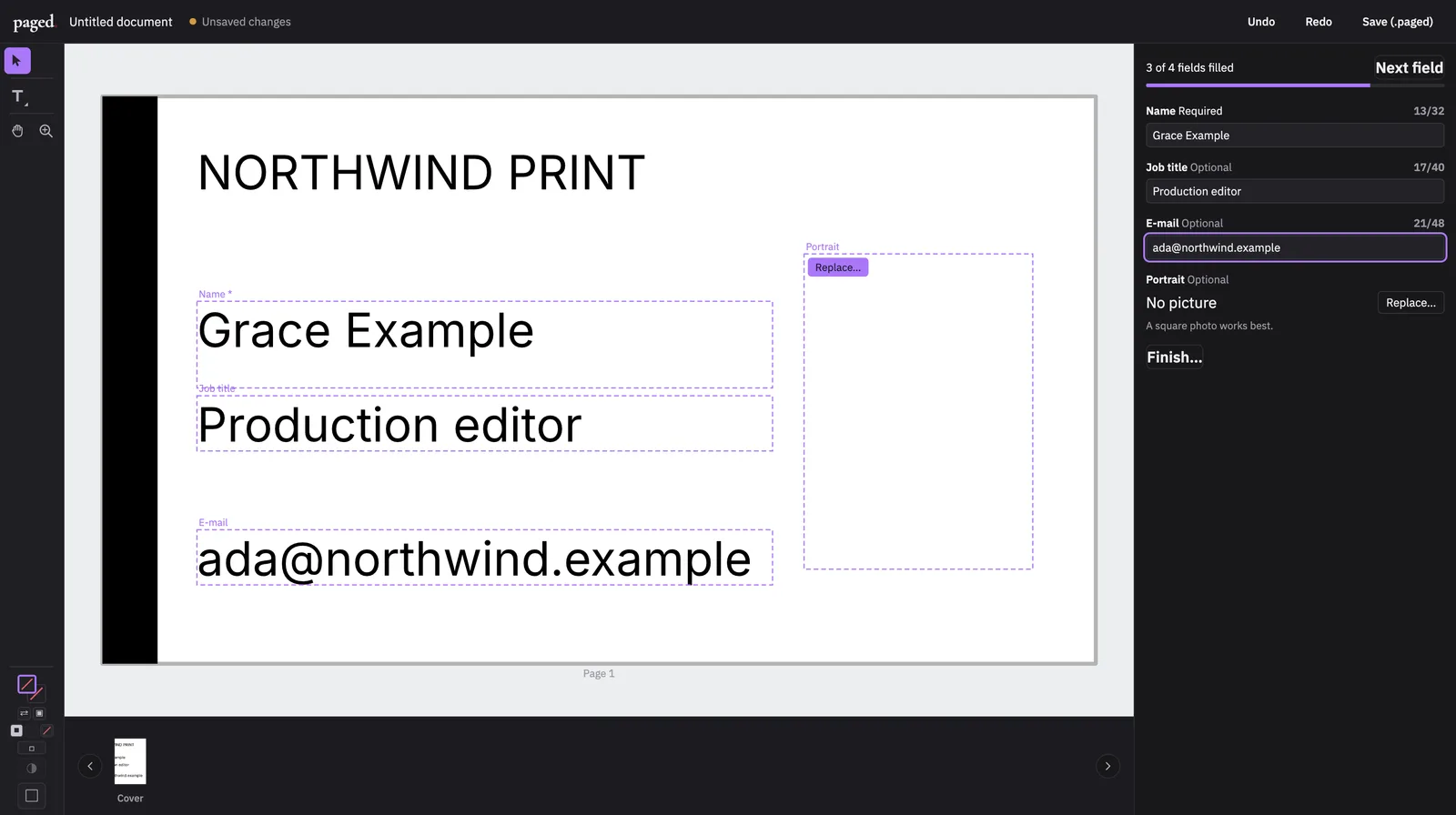
In short Open a template in the editor with ?profile=template-fill and the
session is a filler: a form lists the fields, outlines mark them on the canvas,
and nothing else can change. Embedded, createEditor with the template-fill
preset gives the same editor and a handle to read and set values. On a server,
paged template fill fills a template from JSON and writes .paged, .idml or
PDF, paged template check verifies that a submitted document changed only
its fields, and paged engine-serve fills a template inside an HTTP call.
In the editor
?profile=template-fill (see Profiles and presets)
starts a filler session with:
- The template form (
paged.template.form) as the inspector. It lists the fields in the author's order and groups with a control per kind: a text input that commits on Enter or blur, with a counter when the field has a maximum length; a Replace button for a picture; a checkbox for a visibility field. A module field shows the control its module declares — text, a number, a choice, a toggle, a picture or a table — and its value goes through that module. Kinds that cannot be set yet say so, as does a module field whose module is not loaded. A refusal or a constraint problem shows under the field in words. - Field outlines on the canvas: every field dashed, with its label; a picture field carries a Replace button. The label and button keep their size at any zoom. Authors see the outlines too; an editor or a viewer sees the document as it prints.
- A short tool rail — select, type, hand, zoom — and Undo, Redo and Save in the header. A filler can also type straight into a text field on the canvas with the type tool.
- No menu bar, context toolbar, panel rail, mode bar, command palette or canvas context menu.
Text and visibility values from the form are one undo step each and checked like any edit; a replaced picture keeps the frame's previous fit.
Preview as filler. An author checks a template from the
Template panel: Preview as filler
switches the session to the filler role, so the form, the outlines and the
engine's refusals are what a filler will get, and Back to authoring returns.
?profile=viewer shows the template — or any document — read-only: the
canvas and its page thumbnails with hand and zoom. The session is a viewer, so
the engine changes nothing and nothing is selectable.
eeef38be6, .Embedded
const editor = await createEditor(el, {
  profile: 'template-fill',
  document: { bytes: templateBytes },
  actions: { submit: async () => send(await editor.save()) },
});

await editor.setFieldValues({ headline: 'Grand opening', showBadge: true });
See mountEditor and createEditor, or the editor in an iframe for a host on another origin. The handle sets the engine's own field kinds; module fields are filled in the form.
On a server
The paged command fills and checks templates with the same engine messages
the form sends, in a filler session:
npx @paged-media/paged template fields card.paged
npx @paged-media/paged template fill card.paged \
  --values '{"headline":"Grand opening","showBadge":true}' -o card.pdf
npx @paged-media/paged template check card.paged submitted.paged
check is the server's answer to "did the user change only the fields?": it
refills the template with the submission's own field values and compares the two
documents. The template, not the submission, is the authority. Module values go
to their modules (a picture as { "$file": "photo.jpg" }) when the module's
bundle is loaded. Reference: paged template.
Over HTTP
paged engine-serve (the Rust command line) answers
POST /run one stateless call at a time. A call's optional template fills the
fields before the call's script and export run:
{
  "file": "<the template as base64>",
  "template": {
    "values": [
      { "name": "headline", "value": { "kind": "text", "text": "Grand opening" } },
      { "name": "showBadge", "value": { "kind": "visible", "visible": true } }
    ],
    "role": "filler"
  },
  "export": { "format": "pdf", "pdf": { "standard": "pdfx4" } }
}
role is filler by default, so the engine checks the values against the
template's policy as the editor does. A value that does not fit its field, or a
refusal, answers 422 with the problems, and nothing is exported. The
values are the engine's own kinds (setTemplateFields's list); engine-serve
loads no module bundles, so module fields are filled with paged template fill.
The template field is on main and ships with the next release; the
InDesign Server use case shows a full
engine-serve call.
Live demos
The demo gallery fills templates in the browser: a locked business card, a postcard filled from the host's own form, a custom host UI with its own Submit, a photobook with fields on every page, the same template through an iframe, and batch generation of one PDF per record.
Related
- On paged.media: database publishing.
Permissions and roles
What a template permits, how a filler's permissions are resolved, the three doors where the engine checks every edit, and the typed refusals notPermitted and locked.
Scripting with paged.*
The Boa-based scripting layer — a sandboxed ECMAScript surface for reading and authoring a paged document through the paged.* host API. The full surface is generated from the engine catalog.